EventOps
Building the operating system for the events industry.
0
Global events industry
0
Core operational flows
0
Portfolio management tools
0
Validated with coordinators
01 · The Opportunity
An industry running on organised chaos.
I've spent years designing operational software for complex, high-stakes industries: healthcare payer systems, provider contract management, clinical care platforms. The common thread across all of them: too many moving parts, too many people, and not enough visibility into what's about to go wrong.
I started looking at the events industry and saw the same pattern. A corporate event management company running ten simultaneous events is operationally as complex as a health plan managing thousands of provider relationships.
And unlike healthcare, which has been heavily invested in for decades, the events industry is still running on WhatsApp groups, Excel spreadsheets, and collective memory. Inventory lives in someone's head. Worker schedules are in a Google Sheet three people are editing simultaneously. Payment milestones are chased over email.
"Inventory management is our biggest headache, especially when we're running multiple events at the same time. We find out about conflicts too late."
Event Coordinator, Mumbai, User Research Session
The core insight: Event companies don't manage one event at a time. They manage five, ten, twenty simultaneously. Every existing tool is built for single-event management. EventOps is built for the portfolio first, the individual event second.
02 · The Market Gap
Existing tools solve the wrong problem.
Event management software exists. The problem is what it was built for. Most tools in this space are designed around attendee management, ticketing, and registration: the client-facing layer of an event. Almost none of them address the operational back-end that event management companies actually live in every day.
Cvent & Bizzabo
Built for event marketing and attendee registration, not operational management.
Honeybook
Good for client communication and invoicing, single-event view, no cross-event conflict detection.
Aisle Planner
Rich event detail tools, no portfolio view, no inventory conflict detection.
Asana & Monday
Flexible but generic, no concept of shared resources across concurrent events.
The Gap EventOps Fills
A purpose-built operational platform for event management companies managing multiple concurrent events, with real-time conflict detection for inventory and workers, a portfolio-first view, and a complete event lifecycle.
"Conflict detection as a first-class feature. The question isn't 'what happened?' It's 'what's about to go wrong, and what do I do about it right now?'"
03 · The Design
0 flows. One operating system.
Every screen is designed around the operational reality of running multiple events simultaneously. The UI prioritises what needs attention right now, not a neutral view of everything.
Screen 01
Dashboard
Not a status report. An attention system. Active events, upcoming milestones, inventory conflicts, worker overlaps, and overdue payments—surfaced by urgency, not by date.
Live Alerts Panel
Real-time feed of urgent issues: inventory conflicts, overdue payments, worker overlaps.
Portfolio at a Glance
Active events, revenue status, events by type—the full operational picture.
Conflict Flags on Cards
Each event card surfaces conflict badges directly.
Screen 02
Inventory
Every item. Total count. Current allocation across all active events. Availability status. And a conflict flag the moment something is double-booked—not on event day, but the moment the conflict is created.
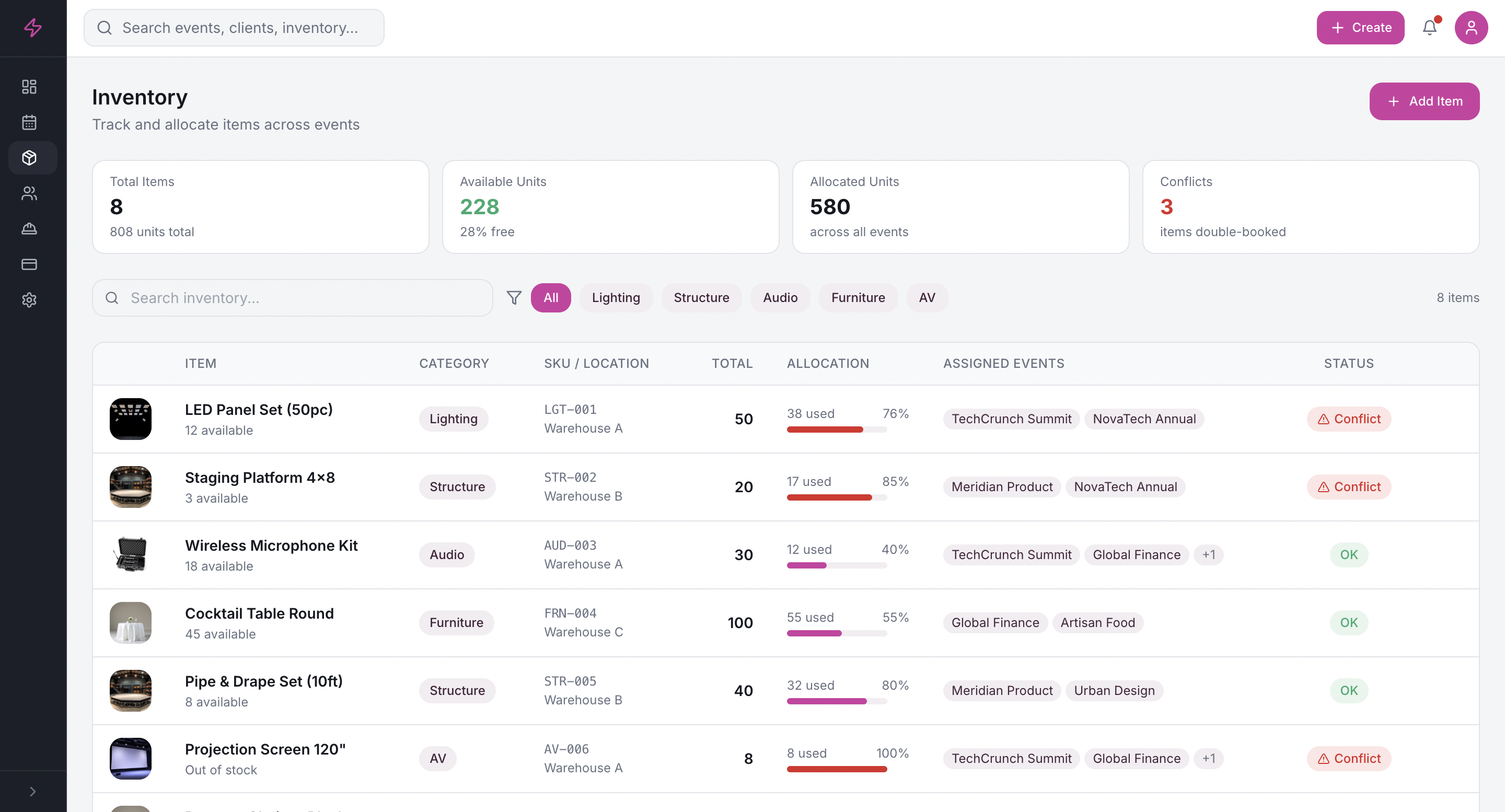
Conflict Detection
Live allocation map showing exactly where every item is committed.
State-Based Visual Language
Available, allocated, or conflicted—not just counted. Red for conflict, amber for low stock.
Live Allocation Status
LED Panel Set double-booked. Chiavari Chairs low stock. PA System fully available.
Screen 03
Workers
Every team member, their assigned events, workload capacity, and overlap status—all visible simultaneously. A coordinator scheduled for two events on the same day is flagged before it becomes a problem.
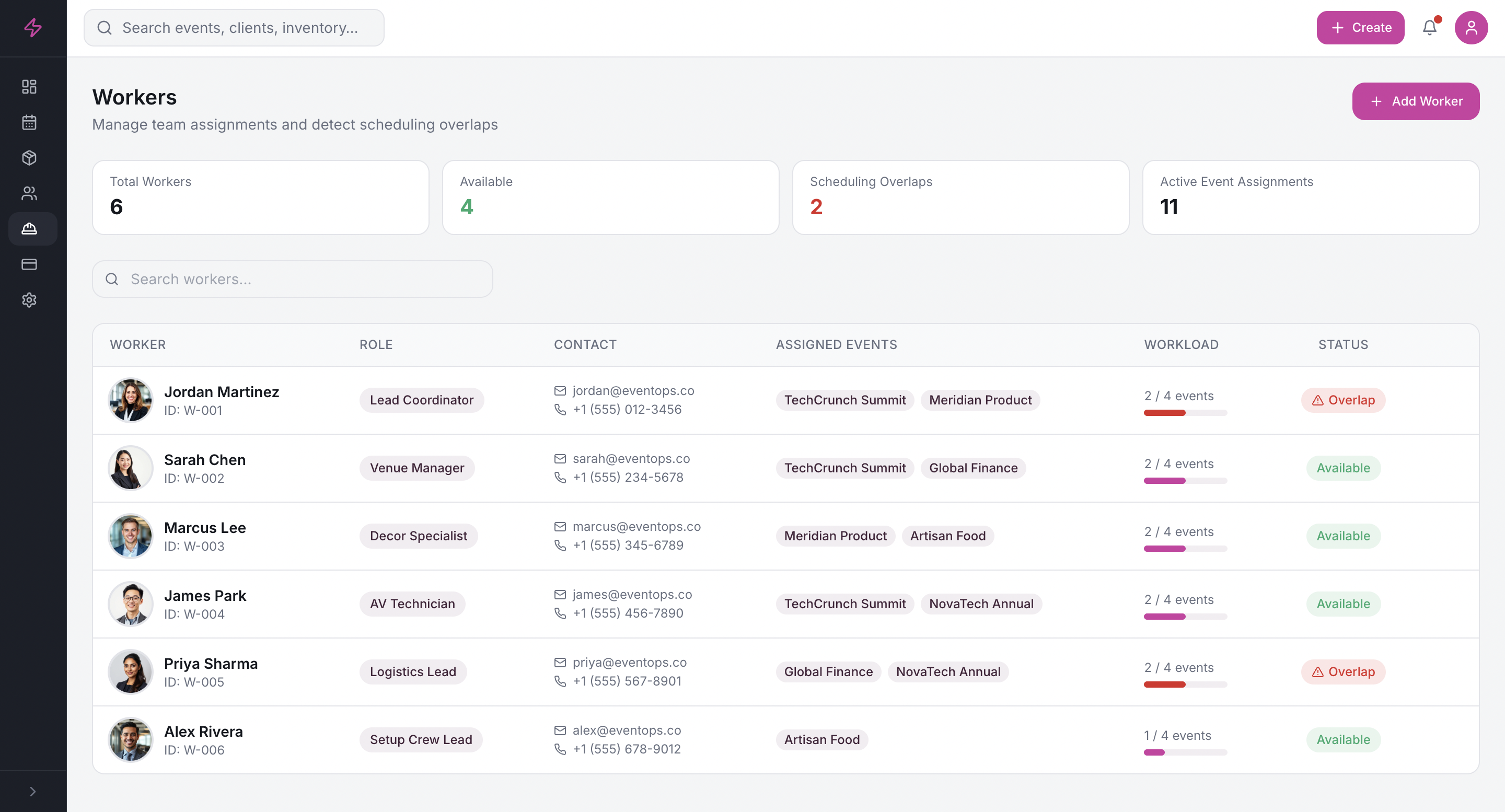
Scheduling Conflict Detection
Worker overlaps surfaced the moment they're created, not discovered during a morning briefing.
Workload & Capacity View
Each team member's current load visible alongside their assignments.
Screen 04
Payments
Payment tracking across all events and all milestones in one view. An overdue payment is visible the moment it's overdue, not when someone finally remembers to chase the client.
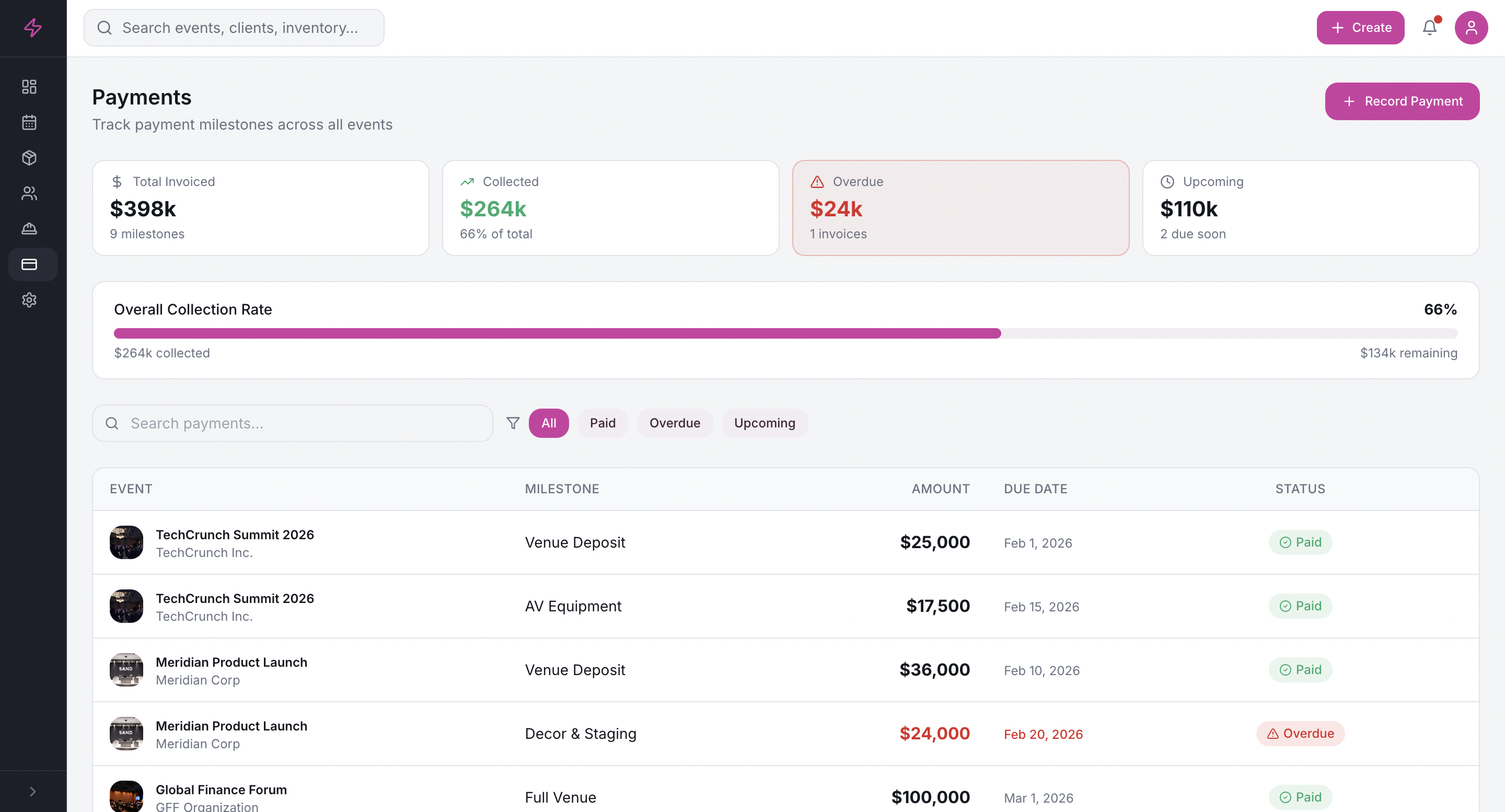
Cross-Event Payment View
All payment milestones across all events: collection rate, overdue amounts, upcoming milestones.
Overdue Flagging
Overdue payments surface immediately with the number of days elapsed.
04 · Design Decisions
The choices that define the product.
How coordinators actually think
EventOps starts with the portfolio: all active events, all conflicts, all milestones, and lets you drill in.
The primary reason to open the app
The Live Alerts panel is not a sidebar feature. It's the product.
The data model enables the UX
Every inventory item tracked as available, allocated, or conflicted—not just counted.
Never lose sight of the portfolio
The Live Alerts panel persists when you drill into an individual event.
05 · Where It's Going
Prototype validated. Now building.
EventOps is an active personal venture. The prototype has been validated with event coordinators in Mumbai: the core pain points (inventory conflicts, worker scheduling, portfolio visibility) are confirmed. The product is now moving from prototype to build. Events industry is complex, but with 0 flows designed, we are ready.
Now
Seven flows designed and prototyped: Dashboard, Event Cards, Event Detail, Timeline, Inventory, Workers, Payments. Validated with coordinators.
Next
Building the backend data model that makes real-time conflict detection possible. Integrating payment processing for milestone collection.
Soon
Event day is on mobile. A stripped-down, high-contrast view for coordinators on the floor: what's happening right now, who's where, what's unresolved.
Later
A client-facing portal for approvals and milestone visibility. A scaled-down version for independent planners.
06 · Reflection
What building this is teaching me.
Every other case study in this portfolio was built for a client. This one is built for a market I identified, a problem I validated, and a product I'm funding myself. That changes the nature of every decision.
The biggest thing I've learned so far is that product strategy and UX design aren't separate disciplines when you're the founder. The decision about which segment to enter first is a design decision as much as a business one.
Four lessons
Validate the pain before designing the solution.
The inventory conflict problem was confirmed directly by coordinators. Building on validated pain is a different experience.
The differentiator has to be in the data model.
Real-time conflict detection isn't a UI feature, it's an architectural decision.
The web app is the planning tool. Mobile is the event tool.
Coordinators plan on desktop and operate on mobile. Different jobs, different contexts.
Pricing is a design problem.
How you package the product shapes what you build. That's the next research priority.